用 AI 快速编写 Python 工具脚本:Excel 打包 ZIP
我的理念是:能用脚本解决的事情就不手动操作,尤其是重复性工作。随着 AI 的出现,这个理念得到了进一步的强化:能用 AI 辅助编写脚本的事情,就不再完全靠自己手写。
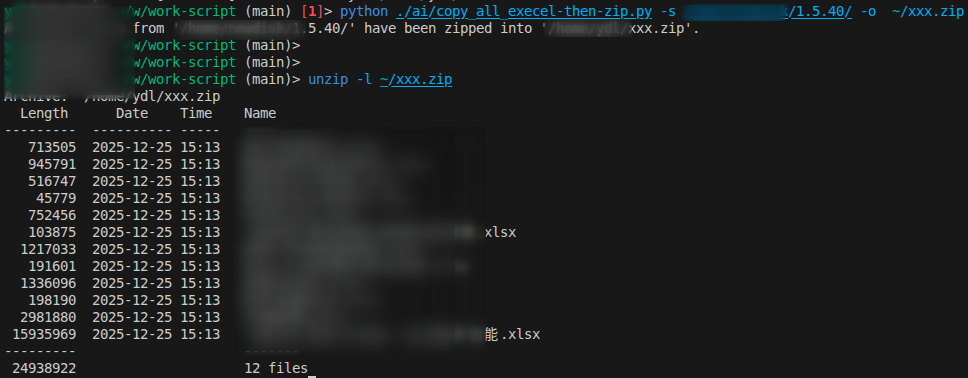
手里有一个简单的需求:将目录下的所有 Excel 文件打包成 zip 文件。传统的做法是手动编写脚本,然后运行脚本完成任务。现在我尝试用 AI 来帮我完成这个任务。
工作环境
我使用的编辑器是 VS Code,并安装了 GitHub Copilot 插件。 Python 版本是 3.11, 操作系统是 Ubuntu 22.04。
我将用 AI 来编写一个 Python 脚本,实现将指定目录下的所有 Excel 文件打包成 zip 文件。
文件头部编写注释,描述脚本功能
我在脚本开头编写了注释,用来描述脚本的功能和使用方法。这有助于 AI 理解我要实现的功能。
# Given a directory containing multiple Excel files,
# copy them to a temp directory and then zip them.
编写方法名,使用 AI 补全方法体
我将功能拆分成两个方法,一个是参数解析方法 parse_arguments,另一个是主逻辑方法 copy_excel_and_zip。我先写方法名,然后让 AI 帮我补全方法体。
AI 发展的速度非常快,几乎可以实时生成代码。我只需要稍微调整 AI 生成的代码,就能得到我想要的结果。更直观的感受是,它的生成速度已经超过了传统自动补全的提示体验。
parse_arguments 方法用于解析命令行参数,获取源目录和输出 zip 文件路径
@dataclass
class CopyExcelArgs:
    source: str
    output: str


def parse_arguments() -> CopyExcelArgs:
    parser = argparse.ArgumentParser(
        description="Copy all Excel files from a directory and zip them."
    )
    parser.add_argument(
        "-s",
        "--source",
        type=str,
        required=True,
        help="Source directory containing Excel files",
    )
    parser.add_argument(
        "-o", "--output", type=str, required=True, help="Output zip file path"
    )
    args = parser.parse_args()
    return CopyExcelArgs(source=args.source, output=args.output)
copyexceland_zip 方法用于实现复制 Excel 文件并打包成 zip 文件的逻辑
def copy_excel_and_zip(source_dir: str, output_zip: str):
    excel_extensions = {".xls", ".xlsx", ".xlsm", ".xlsb", ".odf", ".ods", ".odt"}

    with tempfile.TemporaryDirectory() as temp_dir:
        temp_path = Path(temp_dir)

        # Copy Excel files to temp directory
        for root, _, files in os.walk(source_dir):
            for file in files:
                if Path(file).suffix.lower() in excel_extensions:
                    src_file_path = Path(root) / file
                    shutil.copy2(src_file_path, temp_path / file)

        # Create a zip file from the temp directory
        with zipfile.ZipFile(output_zip, "w", zipfile.ZIP_DEFLATED) as zipf:
            for file in temp_path.iterdir():
                zipf.write(file, arcname=file.name)

    print(f"All Excel files from '{source_dir}' have been zipped into '{output_zip}'.")
编写主函数,调用方法
if __name__ == "__main__":
    args = parse_arguments()
    copy_excel_and_zip(args.source, args.output)
导入所需模块
至于导入的模块,我让 AI 根据方法体自动补全。这里是补全后的代码。
import os
import shutil
import tempfile
import zipfile
from pathlib import Path
import argparse
from dataclasses import dataclass
总结
- AI 的发展已经超出我的预期,而且能够实时生成代码,极大地提升了编程效率。
- 通过编写注释和方法名,AI 能够理解我要实现的功能,并生成相应的代码。
- 在尝试简单的编写脚本任务后,接下来我想尝试一下更复杂的任务,比如用 AI 帮我编写一个自动化测试脚本。或者在业务中实践一些更加复杂的功能开发工作。