Zvec-Grep 检索指南:搜索路径与查询参数
评价一个搜索工具好不好用,一看搜索速度,二看搜索结果,后者尤为重要,超预期更是加分项。Zvec-Grep 不仅查询速度快,搜索结果也会让人眼前一亮。
Zvec-Grep 搜索结果的优秀表现,主要来自两方面:一是多样化的 Embedding 模型,二是可灵活选择的检索路径——语义发现、关键词相关性排序、向量相似检索,以及精确或正则匹配。
为工作区创建好索引后,就可以用 zg 完成搜索任务。
回顾 Zvec 索引
Zvec-Grep 使用 Zvec 向量数据库存储索引,索引位于当前工作区根目录下的 .zvec-grep。
有一点需要注意:代码检索使用 Code 模型;中英混排文档建议使用多语言模型。
tree .zvec-grep/ -L 1
.zvec-grep/
├── files.zvec
├── index.zvec
├── locks
└── manifest.json
zg status 可以查看索引状态:覆盖了多少文件、创建了多少检索对象、使用了哪种 Embedding 模型,一目了然。
zg  status
✓ Workspace index is ready
  /home/xyz/docs

  Coverage    ████████████████████ 100%  1,678 / 1,678 files
  Entities    16,269
  Truncated   0 fragments
  Queue       0 pending · 0 failed

  Embedding   local/potion-multilingual-128m
              256 dimensions · cosine

  Storage     .zvec-grep/index.zvec
查询参数选择
检索路径
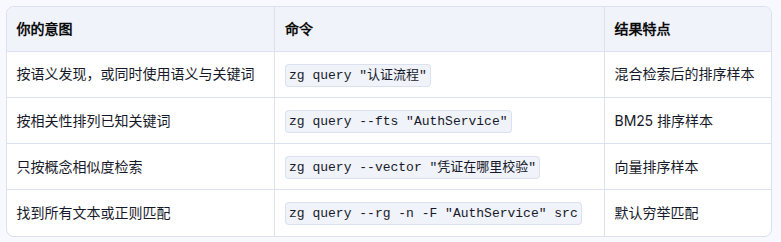
Search routes:
  positional query                  Hybrid FTS and vector search
  --hybrid <query>                  Add an explicit hybrid query
  --fts <query>                     Add an exact/lexical query
  --vector <query>                  Add a semantic/vector query
  --fuse                            Fuse all query groups into one ranked list
  --rg                              Run exhaustive managed ripgrep
zg query 的参数大致分为三类:选择搜索路径、过滤文件或文件类型、选择预览方式及最大结果数。
最简用法:不传任何参数,直接执行 zg query "认证流程",走语义发现搜索。这种方式不保证精确命中,但适合把结果作为 Agent 的上下文补充。
--fts 会对结果评分并排序,检索效果通常最好。
--vector 为纯向量搜索。
--rg 使用 rg 完成精确匹配或正则匹配。
文件过滤
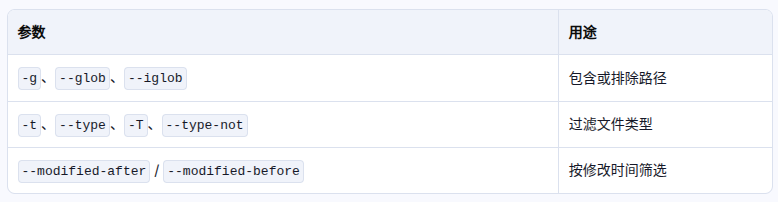
File filters:
  -g, --glob <glob>                 Include paths; prefix with ! to exclude; repeatable
  --iglob <glob>                    Case-insensitive path glob; repeatable
  -t, --type <type>                 Include a ripgrep file type; repeatable
  -T, --type-not <type>             Exclude a ripgrep file type; repeatable
  --modified-after <time>           Only files modified after a date or epoch milliseconds
  --modified-before <time>          Only files modified before a date or epoch milliseconds
  --symbol-type <type>              module, class, interface, function, value, alias
  --prefer-symbol                   Prefer exact indexed symbols
过滤参数可以限定或排除路径,也可以按文件类型筛选,例如只检索 TypeScript 文件:-t ts。--modified-after/before 可按修改时间筛选。
结果选项
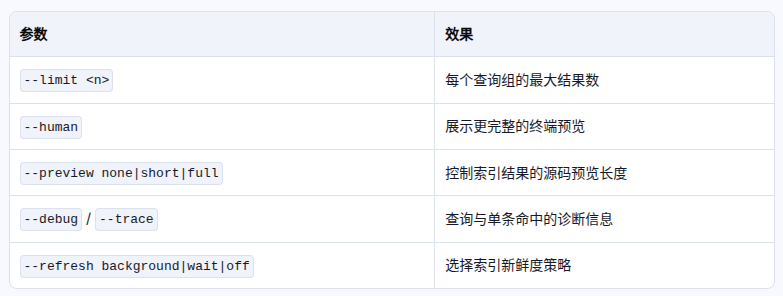
Result options:
  --limit <n>                       Maximum results per group (default: 7)
  --human                           Human-readable output (default: agent markdown)
  --preview <none|short|full>       Indexed preview size (default: none; --human: full)
  --debug                           Print diagnostics to stderr
  --trace                           Include per-hit indexed search trace
  --refresh <background|wait|off>   Refresh policy (defaults: server=background, direct=off)
                                    In direct mode, background warns and falls back to off
  --mode <direct|server|auto>       Select indexed query transport (default: auto)
--limit 限定单次查询返回的最大结果数。
--human 返回可读性更好的结果,包含具体文件、上下文、行号及得分等信息。
示例
zg query --human --fts \
    "当用户点赞评论成功" \
    --limit 3
File: loong/1.6.0/汇总文档/App/动态埋点文档__后端埋点.md
Hits: 2

  #1 heading 【数据埋点】当用户点赞评论成功时记录: matchedBy=fts score=0.0164
  Range: 67-75  Status: fresh
  Kind: markdown
  Heading: 【数据埋点】当用户点赞评论成功时记录:
  Heading level: 3
  Scope: 后端埋点
  Source:
    67  ### 【数据埋点】当用户点赞评论成功时记录:
    68  • 用户ID
    69  • 动态ID
    70  • 动态发布者ID
    71  • 评论ID
    72  • 点赞页面:动态详情页/互动消息
    73    - 来源为动态详情页时:携带卡片ID
    74  - **`产品文档位置`**: 动态详情-动态详情
    75